

Manual time tracking is the deliberate practice of recording work start times, completion times, and task descriptions using self-directed tools, such as physical notebooks, local spreadsheets, or plain text files, without running background monitoring software. Rather than delegating activity tracking to an automated application that logs active window titles or captures desktop screenshots, you maintain direct, active custody of your work record.
Automated time-tracking tools are often marketed for hands-free capture, yet actual tracking accuracy and workflow fit depend heavily on tool configuration and work type. Certain background tracking setups can introduce operational friction into independent professional practices. When tracking tools rely on continuous background capture, aggressive pop-up prompts, or automated idle-time heuristics, they may produce notification fatigue, heightened evaluation anxiety, or the misclassification of reflective problem-solving and paper sketching as inactive periods. The severity of these friction points depends heavily on specific tool settings and client monitoring requirements, but for many solo consultants and independent specialists seeking uninterrupted focus without background software overhead, contemporaneous manual logging provides an intentional, self-directed alternative.
Manual time logging restores intentionality to the workday. When you pause to write down a task before opening a new file or starting a research sprint, you establish an explicit cognitive boundary around your effort. This conscious transition encourages sustained concentration on a single objective while establishing clear, structured billing documentation. To establish defensible records, professionals must first distinguish which operational tasks qualify as billable hours versus internal overhead, a framework detailed in our comprehensive guide to billable time tracking.
Understanding how to track time manually provides complete autonomy over your professional data. You control exactly what details appear on your records, eliminate recurring software subscription fees, and protect sensitive client materials from third-party cloud servers.
Manual vs Automated Time Tracking: An Objective Comparison
Choosing between manual tracking and automated software requires evaluating your client expectations, operational scale, and personal cognitive habits. Neither approach suits every professional environment. Automated systems excel when managing distributed engineering teams with hundreds of concurrent micro-tasks, while manual workflows offer unmatched simplicity and confidentiality for focused independent operators.
The primary distinction centers on observability versus autonomy. Automated tools observe background workstation activity passively. Capture precision varies by software and configuration: some passive trackers log detailed window-switch timestamps while others aggregate intervals or rely on idle heuristics, often generating granular activity logs that still require manual categorization and review. In contrast, manual tracking requires proactive entry, capturing the strategic business intent of the work at the moment of execution.
The following comparison details the operational trade-offs across six fundamental operational dimensions:
| Operational Dimension | Manual Time Tracking | Automated Background Tracking |
|---|---|---|
| Client Data Privacy | Records kept in a physical notebook or a genuinely local file can remain under the professional’s direct control. Cloud-synchronized spreadsheets and other online services may store or transmit information to third-party infrastructure, depending on their configuration. | Variable. Cloud applications vary in data collection: some capture window titles, URLs, or periodic screen thumbnails, which may introduce non-disclosure agreement (NDA) considerations, while others provide configurable local storage or privacy controls. |
| Cognitive Overhead | Requires deliberate behavioral discipline at task boundaries. As an illustrative planning estimate (rather than a measured empirical result), this routine assumes roughly five minutes of cumulative attention per workday (four fixed minutes plus approximately ten seconds per task transition). | Can reduce active manual entry, though initial project setup, manual timer controls, project reassignments, retroactive corrections, or idle-time prompts may still require attention depending on the tool and workflow. |
| Deep Work Protection | High (when practiced without digital timers). Avoids desktop reminders, idle prompts, and background monitoring, though brief self-directed transition notes are still required. | Varies by Tool Configuration. Passive background loggers without popups preserve focus well, whereas tools configured with aggressive idle prompts, screenshots, or visible countdown timers can interrupt cognitive flow. |
| Setup Complexity and Cost | Minimal. Operates immediately using a physical pen and notebook or a free local spreadsheet. Zero recurring SaaS software expenses. | Moderate to High. Requires software installation, browser extension setup, client project mapping, mobile synchronization, and recurring per-seat fees. |
| Invoice Documentation | Contemporaneous task descriptions can help explain invoice entries during client review. Acceptance depends on the service agreement and the client’s documentation requirements. | Variable. Automated logs often produce cluttered timelines containing hundreds of fragmented rows that require substantial cleanup before client presentation. |
| Team Scalability | Limited. Excellent for solo operators, partners, and boutique teams of two to five members. Unwieldy for large enterprise service organizations. | High. Centralized administrative dashboards allow managing dozens or hundreds of remote employees across multiple global time zones. |

Manual tracking proves ideal for professionals whose primary deliverables require sustained, uninterrupted thought, including technical writers, strategic consultants, software architects, and boutique designers. If your business model relies on high-trust relationships and value-oriented milestones rather than sub-minute surveillance, manual logging delivers institutional rigor without bureaucratic friction.
The Retrospective Memory Trap: Why End-Of-Day Logging Fails
The single greatest failure point in manual timesheet tracking is retrospective reconstruction. Many practitioners begin manual tracking with good intentions, but delay their entries until Friday afternoon or the final hours of the month. Attempting to rebuild an entire week of complex client work from memory produces inaccurate invoices, unbilled effort, and administrative stress.
Human episodic memory degrades rapidly across time. When you try to remember whether a strategy phone call lasted 35 minutes or 55 minutes three days after the conversation occurred, the brain fills in gaps by averaging durations or omitting brief transitions entirely. Minor administrative phone calls, quick email clarifications, and file formatting sprints vanish from memory, resulting in cumulative billable leakage.
To understand the nature of daily activity recall, consider the methodological framework of the U.S. Bureau of Labor Statistics (BLS) American Time Use Survey (ATUS). The BLS ATUS captures population-level time allocation using structured, next-day 24-hour retrospective diary interviews. Survey researchers recognize that next-day recall provides acceptable fidelity for broad demographic lifestyle categories, such as aggregate hours spent commuting, sleeping, or preparing meals. While ATUS methodology illustrates how structured interviews capture high-level daily time allocation over 24-hour windows, it does not quantify billing accuracy on commercial client projects. However, relying on retrospective recall across multi-day billing cycles introduces unverified estimates and cognitive smoothing into professional billing records that require itemized commercial support.
The underlying psychological mechanism of memory decay was documented by German psychologist Hermann Ebbinghaus in his pioneering 1885 work, Memory: A Contribution to Experimental Psychology. Ebbinghaus demonstrated that retention of unreinforced information drops sharply within the initial hours following exposure, leveling off into a gradual decay curve over subsequent days. The retention curve presented in our conceptual diagrams serves strictly as an illustrative, qualitative model of detail erosion rather than a measured statistical prediction of lost freelance billable hours. Ebbinghaus’s historical formula evaluated the memorization of synthetic, non-contextual syllables under laboratory conditions. In professional service practices, timesheet discrepancies arise from episodic memory degradation, task-switching friction, and retrospective cognitive smoothing rather than synthetic syllable decay.
Furthermore, relying on continuous workstation monitoring to bypass human memory introduces distinct organizational considerations. Federal guidance published by the National Institute for Occupational Safety and Health (DHHS [NIOSH] Publication No. 99-101, “Stress…At Work”) identifies organizational conditions such as heavy workload, lack of worker control over tasks, and poor job design as primary working-condition hazards contributing to job stress. While Publication No. 99-101 addresses workplace stress factors rather than evaluating commercial freelance time-tracking software, its findings underscore why preserving practitioner autonomy matters.
These organizational dynamics intersect with occupational ergonomics and psychology literature examining Electronic Performance Monitoring (EPM). In an empirical workplace survey of 745 telecommunications workers, Smith et al. (1992) observed higher self-reported job boredom, anxiety, and somatic complaints among monitored employees compared to unmonitored peers, while noting that task design and supervisory climate significantly influenced psychological strain. In a cross-sectional investigation across two studies of monitored office and telecommunications workers, Carayon (1994) examined the effects of electronic performance monitoring on job design and worker stress, observing that job design factors (such as perceived workload demands and reduced worker control) mediated the relationship with worker stress, emphasizing that management implementation and work organization rather than monitoring technology alone shaped health complaints. Furthermore, in a controlled laboratory experiment, Aiello and Svec (1993) demonstrated that computer monitoring increased physiological arousal and social facilitation effects, with task complexity moderating performance outcomes (impairing complex data entry while facilitating simple tasks). Importantly, empirical researchers emphasize that psychological responses vary substantially depending on monitoring transparency, feedback mechanisms, and individual autonomy. Not all automated time tracking tools function as invasive surveillance, but for solo consultants and small practices, self-directed manual tracking inherently preserves complete personal control over the recording process.

To maintain defensible manual records that support routine client invoice reviews, record work contemporaneously whenever possible. If you miss an entry, reconstruct it as soon as practical, preferably on the same day, using available records to support the estimate. Clearly label reconstructed entries rather than presenting them as contemporaneous records.
Four Practical Manual Time Tracking Methods
Implementing a manual tracking workflow does not require elaborate setups. Different practitioners benefit from different tactile and digital interfaces. Below are four practical manual time-tracking methods that require zero automated monitoring software.
Method 1: The 15-Minute Paper Block Grid (Physical Notebook)
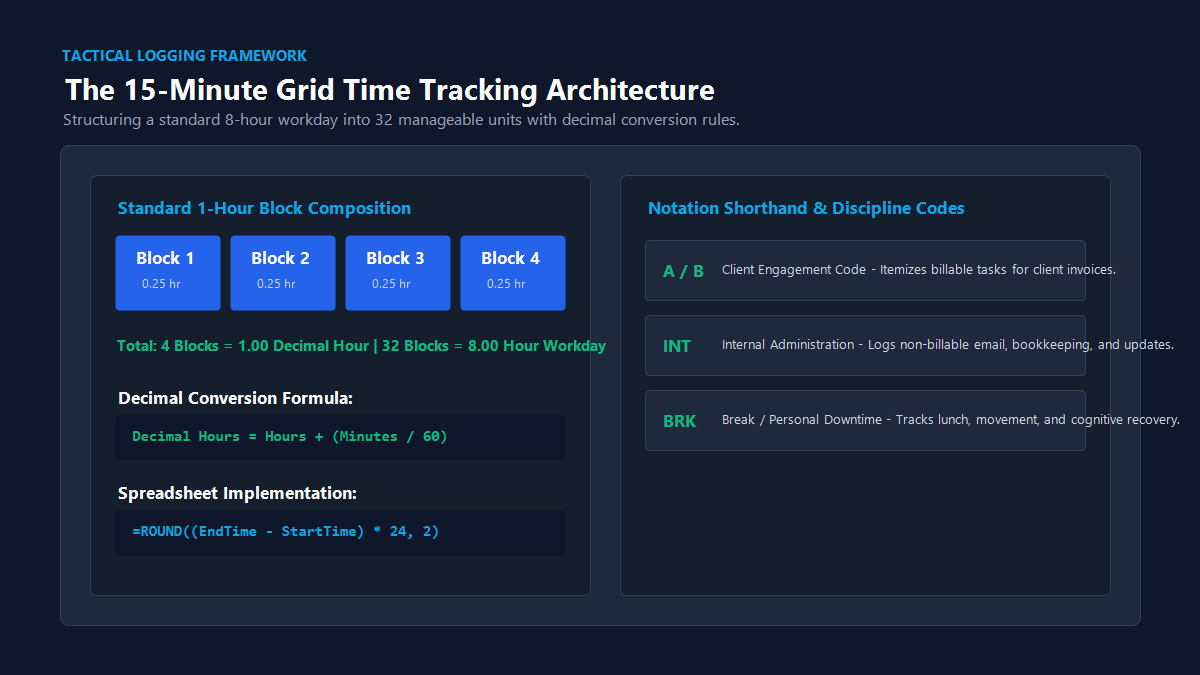
The 15-minute paper grid represents the most tactile, distraction-free manual method available. A standard eight-hour professional workday comprises 32 fifteen-minute increments (or 36 intervals across a nine-hour span from 08:00 to 17:00 when accounting for an unpaid one-hour midday break). By dividing your daily page into a vertical grid corresponding to your planned schedule (32 working intervals, or 36 intervals inclusive of lunch), you create an immediate physical visual map of your daily capacity.
To implement this method:
- Place a dedicated, spiral-bound grid or dot-matrix notebook flat on your desk, positioned directly adjacent to your keyboard.
- In the left margin, write the start times of your workday in 15-minute intervals, starting at
08:00,08:15,08:30, with the final interval starting at15:45for an uninterrupted eight-hour block ending at16:00(32 intervals), or starting at16:45for a nine-hour span ending at17:00when accounting for a one-hour midday break (36 total intervals; do not count17:00as an additional interval start). - Assign a simple shorthand letter or two-letter code for each active client (for example,
[A]for Acme Corp,[B]for Beta Logistics, and[INT]for Internal Admin). - When you begin a task, write the client code and a three-word deliverable description next to the current interval. Draw a vertical line downward through each 15-minute block as your work progresses.
- When switching tasks, draw a horizontal capping line, note the ending timestamp, and initiate the next project block immediately below it.
================================================================================
PHYSICAL NOTEBOOK 15-MINUTE DAILY TIME LOG
================================================================================
Date: [YYYY-MM-DD]               Day: [DAY OF WEEK]
Daily Target: 8.00 Hours          Total Logged: [TOTAL] Hours

TIME       CODE  TASK DESCRIPTION                         NOTES / DELIVERABLE
--------------------------------------------------------------------------------
08:00 AM   [INT] Morning inbox triage, calendar alignment Email review
08:15 AM   [INT] Morning inbox triage, calendar alignment Planning
08:30 AM   [A]   API Authentication Endpoint Refactor    Drafting token router
08:45 AM   [A]   API Authentication Endpoint Refactor    Drafting token router
09:00 AM   [A]   API Authentication Endpoint Refactor    Writing unit tests
09:15 AM   [A]   API Authentication Endpoint Refactor    Writing unit tests
09:30 AM   [A]   API Authentication Endpoint Refactor    Fixing bearer validation
09:45 AM   [A]   API Authentication Endpoint Refactor    Git push & commit
10:00 AM   [B]   Q3 Marketing Analytics Pipeline Review  Data ingestion bug
10:15 AM   [B]   Q3 Marketing Analytics Pipeline Review  Schema adjustments
10:30 AM   [B]   Client Status Sync (Zoom Call)          Reviewing milestones
10:45 AM   [B]   Client Status Sync (Zoom Call)          Action items documented
--------------------------------------------------------------------------------
Notation Legend:
[A] = Client A (Acme Corp) | [B] = Client B (Beta Tech) | [INT] = Internal Overhead
================================================================================
The physical presence of the notebook on your desk acts as an environmental prompt. Because the paper sits outside your computer monitor, it remains permanently visible, immune to minimized browser windows or closed desktop applications.
Method 2: The Minimal Spreadsheet Tracker
For professionals who prefer digital calculations without background software, a minimalist spreadsheet offers instant mathematical reconciliation. Spreadsheets in Microsoft Excel, Google Sheets, or LibreOffice Calc allow you to aggregate billable hours dynamically, sort tasks by client, and generate client-ready invoice summaries in seconds.
A robust manual spreadsheet tracker requires only seven core column headers:
- Date (Column A): Standard ISO format (
YYYY-MM-DD). - Client / Project (Column B): Client name or project identifier.
- Task Description (Column C): Specific, deliverable-focused summary.
- Start Time (Column D): Recorded in 24-hour time (e.g.,
09:15). - End Time (Column E): Recorded upon task conclusion (e.g.,
11:45). - Decimal Hours (Column F): Calculated using the formula
=(E2-D2)*24. - Billable Status (Column G): Categorized as
BillableorInternal.
To avoid rounding errors across hundreds of monthly rows, standard practice dictates converting hours and minutes into decimal notation using standard 15-minute intervals (0.25, 0.50, 0.75, 1.00). In spreadsheet software, wrap the duration calculation with rounding functions:
=ROUND((EndTime - StartTime) * 24, 2)
This formula reconciles four 15-minute entries directly to 1.00 decimal hour (4 × 0.25 = 1.00), reducing rounding discrepancies when client accounts payable teams review itemized timesheet totals.
Method 3: The Plain Text Timestamp Log
Software developers, system administrators, and command-line enthusiasts often find highest adherence using plain text logs (Markdown or simple text files). Kept open in lightweight editors like VS Code, Sublime Text, Vim, or Notepad, a text log allows instantaneous notation without switching from technical development environments.
Adopt a pipe-delimited or tabular ASCII syntax:
YYYY-MM-DD | START - END | CLIENT | TASK DESCRIPTION
A sample day in a plain text log appears as follows:
# MANUAL TIME LOG: WEEK 47

## 2026-11-23 (Monday)
08:30 - 09:15 | Internal | Schedule review and client correspondence
09:15 - 11:45 | Acme Corp | Database indexing and migration script execution
11:45 - 12:30 | Lunch    | Personal break
12:30 - 14:00 | Acme Corp | Load testing staging cluster and benchmarking queries
14:00 - 15:30 | Beta Co   | Executive dashboard technical specification draft
15:30 - 16:15 | Internal | Invoicing preparation and timesheet reconciliation
The plain text method offers distinct technical benefits:
- Zero proprietary software lock-in; readable by any operating system for decades.
- Negligible file size (typically under 100 kilobytes for an entire year of logs).
- Instant searchability using standard command-line tools like
grepor text editor search (Ctrl+F). - Zero battery drain or background resource utilization.
Method 4: The Physical Stopwatch and Desk Timer
For practitioners who find digital timers prone to being forgotten, a standalone, physical digital stopwatch or desktop mechanical timer provides an authoritative physical focal point. Resting beside your display, a physical timer separates your time measurement from your workstation operating system.
Unlike software widgets that hide behind full-screen applications, a desk stopwatch requires a physical press of a button to start and pause. That physical tactile action reinforces the psychological boundary between deep focus and casual distraction. When the timer is ticking, you are actively committed to the designated sprint; when you stand up or switch tasks, you press stop and write down the elapsed time immediately.
The Five-Minute Daily Manual Logging Routine
The primary barrier to successful manual time tracking is behavioral friction. If your recording system feels laborious, you will abandon it within two weeks. To build sustainable tracking habits, structure your effort into a standardized four-step daily cadence. The framework consists of four minutes of fixed administrative routines across the day (a 60-second morning setup, a 60-second midday audit, and a 2-minute evening reconciliation) plus approximately ten seconds per recorded task transition. For a professional logging six to eight focus blocks (involving five to seven task transitions), total daily logging time spans roughly 4:50 to 5:10 (approximately five minutes total), depending on the number of transitions. Rather than promising universal time savings across every professional practice, this structured cadence provides an intentional, bounded process for consultants who choose manual recordkeeping.

1. Morning Setup (60 Seconds): Setting the Day Baseline
At the start of your workday, open your notebook or tracking spreadsheet before launching your email client or web browser. Write today’s date, record your morning arrival timestamp, and review your top two priority client milestones for the day. Setting your tracking container first thing in the morning signals to your brain that every subsequent unit of work will be deliberately accounted for.
2. Real-Time Notation (10 Seconds per Transition): Capturing Boundaries
Do not wait until the end of a multi-hour session to record what you accomplished. When you conclude a work sprint, pause for ten seconds before opening the next application. Record your concluding timestamp, write a concise deliverable summary (e.g., “Drafted technical specification v1”), and note the start timestamp of your next task. These brief ten-second micro-pauses mitigate the risk of retrospective detail loss by capturing exact boundaries while work context remains immediate.
3. Midday Check (60 Seconds): Catching Drift
Before stepping away for lunch or afternoon exercise, take 60 seconds to review your morning entries. If an impromptu phone call or urgent email thread occurred between 10:30 and 11:00 that went unrecorded, capture it immediately while details remain fresh in short-term memory. Verify that your morning subtotals reconcile with elapsed wall-clock hours.
4. Evening Closeout (2 Minutes): Daily Reconciliation
At the conclusion of your workday, invest two final minutes to calculate your daily subtotals. Sum your billable hours by client account, verify that all decimal conversions are accurate, and compare your total logged hours against your target workday capacity. Once your daily numbers balance, close your tracking file or shut your physical notebook. This clear ritual signals the end of professional responsibilities and provides peace of mind.
For professionals managing complex advisory retainers or multiple client allocations, consistent daily reconciliation ensures that monthly billable caps are never breached unexpectedly, a principle explored thoroughly in our guide to consultant time tracking.
Worked Example (Hypothetical): A 5-Day Consultant Sprint Log
To demonstrate how manual logging operates in a professional practice, consider the following illustrative hypothetical worked example.
In this scenario, a solo technical consultant provides systems integration and infrastructure architecture services to two active commercial clients: Client A (an enterprise logistics platform) and Client B (a regional fintech startup). In addition to client deliverables, the consultant logs internal practice administration, such as invoicing, business planning, and infrastructure maintenance.
The consultant utilizes a local manual spreadsheet tracker with real-time transition logging, recording hours to the nearest quarter hour (0.25 decimal hours). Over the course of a five-day working week, the consultant logs 36.50 total hours.
The table below presents the unabridged daily log entries:
| Workday | Client Allocation | Logged Hours | Deliverable Description | Daily Subtotal |
|---|---|---|---|---|
| Monday | Client A | 4.50 hrs | Database schema audit and partition performance indexing | 7.25 hrs |
| Client B | 2.00 hrs | Security token validation and webhook callback debugging | ||
| Internal Admin | 0.75 hrs | Weekly project planning, inbox review, and schedule triage | ||
| Tuesday | Client A | 6.00 hrs | Core API refactoring and asynchronous worker queue migration | 8.00 hrs |
| Client B | 1.50 hrs | Third-party payment gateway integration architecture review | ||
| Internal Admin | 0.50 hrs | Cloud server security patching and credential rotation | ||
| Wednesday | Client A | 3.50 hrs | Staging deployment execution and automated integration testing | 7.50 hrs |
| Client B | 3.00 hrs | Data ingestion pipeline optimization and Redis cache tuning | ||
| Internal Admin | 1.00 hr | Quarterly estimated tax bookkeeping and receipt ledger audit | ||
| Thursday | Client A | 5.25 hrs | Production rollout monitoring and latency optimization | 7.75 hrs |
| Client B | 2.00 hrs | Technical documentation drafting for client engineering team | ||
| Internal Admin | 0.50 hrs | Software license renewals and client contract filing | ||
| Friday | Client A | 2.00 hrs | Post-rollout client stakeholder sync and sprint retrospective | 6.00 hrs |
| Client B | 3.00 hrs | Disaster recovery failover simulation and audit report | ||
| Weekly Wrap | 1.00 hr | Weekly timesheet reconciliation, invoice staging, client updates |
Complete Mathematical Reconciliation
Every decimal hour in this illustrative sprint reconciles with mathematical precision across daily and client distributions.
1. Daily Sum Reconciliation:
- Monday:
4.50 + 2.00 + 0.75 = 7.25 hours - Tuesday:
6.00 + 1.50 + 0.50 = 8.00 hours - Wednesday:
3.50 + 3.00 + 1.00 = 7.50 hours - Thursday:
5.25 + 2.00 + 0.50 = 7.75 hours - Friday:
2.00 + 3.00 + 1.00 = 6.00 hours - Cumulative Total:
7.25 + 8.00 + 7.50 + 7.75 + 6.00 = 36.50 hours
2. Client Allocation Breakdown:
- Client A (Logistics Platform):
4.50 (Mon) + 6.00 (Tue) + 3.50 (Wed) + 5.25 (Thu) + 2.00 (Fri) = 21.25 hours
Proportion of Total Workweek:21.25 / 36.50 = 58.22% - Client B (Fintech Startup):
2.00 (Mon) + 1.50 (Tue) + 3.00 (Wed) + 2.00 (Thu) + 3.00 (Fri) = 11.50 hours
Proportion of Total Workweek:11.50 / 36.50 = 31.51% - Internal Administration & Weekly Wrap:
0.75 (Mon) + 0.50 (Tue) + 1.00 (Wed) + 0.50 (Thu) + 1.00 (Fri) = 3.75 hours
Proportion of Total Workweek:3.75 / 36.50 = 10.27%
3. Category Sum Reconciliation:
- Total Hours Reconciled:
21.25 (Client A) + 11.50 (Client B) + 3.75 (Admin) = 36.50 hours - Percentage Sum Reconciled:
58.22% + 31.51% + 10.27% = 100.00%
This example allocates 32.75 of 36.50 recorded hours to billable work, producing a calculated billable utilization rate of approximately 89.73%. The remaining 3.75 hours represent the non-billable time in this particular example. This calculation describes the sample week only; it is not an industry benchmark or a recommended utilization target. Creative professionals and studio leads tracking iterative revisions face similar allocation challenges, which are addressed in detail within our specialized guide on time tracking for designers.
From Manual Logs to Professional Client Invoices
Manual time entries deliver maximum value when seamlessly converted into professional, client-ready billing statements. Raw timesheets containing dozens of detailed timestamp lines should never be dumped directly into an invoice document without aggregation.
Aggregating Entries into Client Summaries
Clients review invoices to verify that milestone objectives have been achieved, not to decipher minute-by-minute personal schedules. Before drafting your invoice, summarize your daily log lines into high-level deliverable categories. For instance, in our worked example, the consultant aggregates Client A’s 21.25 hours into three concise line items:
- Database architecture and partition indexing:
4.50 hours - Core API refactoring and worker queue migration:
9.50 hours(combining Tuesday and Wednesday) - Production deployment monitoring and stakeholder retrospective:
7.25 hours(combining Thursday and Friday)
For a concrete demonstration of how to format itemized hourly invoices with verified payment terms, consult our reference guide featuring a sample invoice for hours worked.
Maintaining Auditable Historical Archives
Always preserve your raw, unedited manual tracking logs alongside final invoices. Contemporaneous daily logs provide valuable documentation to support billed hours during client invoice reviews or commercial audits, though no manual record can conclusively prove work performed in isolation. Record retention schedules vary depending on document classification, business entity structure, and specific tax circumstances. Under Internal Revenue Code (IRC) § 6501, the statutory period of limitations for assessing tax is generally three years from the date a return is filed, extending to six years if an omission of gross income exceeds 25%, and remaining open indefinitely in cases of false returns, willful tax evasion, or unfiled returns. While business taxpayers must preserve books and records sufficient to substantiate reported income and deductions under IRC § 6001 through the applicable assessment period, IRC § 6501 governs IRS tax assessment authority rather than creating a general commercial retention mandate for client timesheets. Similarly, federal wage and hour regulations under the Fair Labor Standards Act (FLSA) govern covered employers rather than exempt independent contractors, but establish recognized benchmarks for recordkeeping: 29 CFR § 516.5 mandates preserving basic payroll records, employment contracts, and collective bargaining agreements for at least three years, whereas 29 CFR § 516.6 requires preserving supplementary basic records (specifically including daily time cards, work sheets, wage rate tables, and work schedules) for at least two years. Because retention requirements depend on entity classification, employment status, state commercial statutes of limitations, and client contract terms, consult a qualified tax advisor or attorney to establish an archive schedule tailored to your business.
Free Manual Time Tracking Downloads
Production-ready spreadsheet trackers, printable daily grids, and customizable Word procedures.
Manual Timesheet & Billing Calculator (Excel)
Spreadsheet with pre-configured decimal formulas, daily reconciliation, and client allocation summaries.
Printable 15-Minute Daily Time Grid (PDF)
High-resolution print-ready grid containing thirty-two 15-minute blocks, client code legends, and daily totals.
Manual Time Tracking Operating Procedure (Word)
Standard operating procedure template establishing rounding protocols, daily habits, and invoice review steps.
Frequently Asked Questions About Manual Time Tracking
Is manual time tracking accurate enough for commercial client billing?
Manual time tracking can achieve commercial audit defensibility, but relative accuracy depends on timely entry, disciplined reconciliation, and the specific capabilities of each tool. Automated software excels at capturing passive background timestamps and micro-intervals without human memory lapses, yet it often requires substantial post-hoc sorting to separate billable work from personal browsing or internal administration. Contemporaneous manual tracking captures deliverable context and commercial intent directly at task boundaries, but it remains vulnerable to forgotten entries or delayed notation if not logged immediately. Rather than outperforming automated systems across every metric, a disciplined manual workflow provides deliberate, defensible records for focused professionals without continuous background software running.
How should I handle small five-minute tasks like answering quick client emails?
Do not attempt to log individual three-minute email interruptions in isolation. Instead, batch small communications into dedicated administrative blocks (e.g., 30 minutes of morning triage or 30 minutes of afternoon correspondence). If an urgent client inquiry requires immediate attention during a deep focus block, record it against that specific client’s account rounded to your contractual minimum billing increment, such as 0.25 hours (15 minutes), as specified in your client agreement.
What should I do if I forget to log a time block during the day?
Reconstruct the unrecorded block as promptly as possible on the same day rather than postponing review to the end of the week. Review your calendar invites, sent emails, browser history, Git commit logs, or phone timestamps to corroborate that work took place during that window and establish sequence boundaries. Keep in mind that digital event logs corroborate activity at discrete moments, but they do not establish exact working durations on their own (for example, a commit at 11:15 AM confirms work was submitted, but not whether coding began at 09:30 or 11:00). Cross-reference these event markers with your surrounding logged blocks, record a conservative estimate with an explicit notation that it was reconstructed, and resume contemporaneous point-of-work notation for subsequent tasks.
Do corporate clients accept manual timesheet summaries on invoices?
Acceptance depends strictly on the governing contract terms and the client’s internal accounts payable requirements. Some clients accept itemized spreadsheet or manual time summaries attached to invoices when they detail the billing period, project reference, hourly rate, and descriptive task entries, whereas other clients require time entry in a designated electronic platform or vendor management system (VMS) stipulated in their Master Services Agreement (MSA). Independent professionals should review contract terms and confirm billing documentation requirements with the client’s accounts payable team before relying on manual logs.