
An invoice for hours worked shows who is billing whom, which dates the work covers, what was done, how many reviewed hours each task took, the agreed rate for each line, and the amount due with payment terms. The clearest way to see that is a finished example, so the complete sample invoice for hours worked is right below. After it, you’ll find the fields to include, the steps for building the lines, and a short checklist to run before you send anything.
This guide starts at a specific point. It assumes one client’s hours have already been reviewed against the agreement and are eligible to bill. If you still need to record, classify or review time, start with how to track billable time and come back once your reviewed entries are ready.
Sample Invoice for Hours Worked (Fictional)
Fictional illustration. Not a real invoice. Every name, date, rate and amount below was made up to teach the format. The rates are not typical or recommended, and no client work or payment is implied.
Invoice DEMO-001
| Field | Detail |
|---|---|
| From | Pine Coast Studio (fictional) |
| Provider address and contact | [Provider address and contact placeholder] |
| Bill to | Northline Services (fictional) |
| Client address and contact | [Client address and contact placeholder] |
| Invoice number | DEMO-001 |
| Issue date | November 10, 2026 |
| Billing period | November 2 to November 6, 2026 |
| Project | Website workflow support |
| Due date | November 24, 2026 (Net 14 under the example agreement) |
Itemized hours
| Service date | Approved service | Reviewed hours | Agreed hourly rate | Amount |
|---|---|---|---|---|
| Nov 2, 2026 | Scope-approved kickoff/workshop | 1.25 | $80.00 | $100.00 |
| Nov 3, 2026 | Draft implementation specification | 2.00 | $80.00 | $160.00 |
| Nov 5, 2026 | Approved specialist review | 1.50 | $100.00 | $150.00 |
| Nov 6, 2026 | Final handoff documentation | 0.75 | $80.00 | $60.00 |
| Total | 5.50 hours | $470.00 |
| Summary | Amount |
|---|---|
| Subtotal | $470.00 |
| Total due | $470.00 |
Payment instructions: [Payment method and instructions placeholder, as agreed with the client]
Terms: Payment due by November 24, 2026, based on the fictional Net 14 term in this example agreement.
A few assumptions sit behind this example. The fictional agreement allows a separate $100 rate for specialist review, which is the only reason one line differs from the $80 rate. There are no taxes, expenses, deposits, discounts, retainers or late fees in this scenario. That’s a simplification for teaching, not a statement that a real business can leave those out.
Also notice what the invoice doesn’t contain: hours still pending approval. Keep those in the review log and outside the invoice until the applicable agreement or required approval supports billing them.
What Information Belongs on an Hourly Invoice?
There’s no single universal invoice layout, but a useful hourly invoice should make its essential details easy to find. Stripe’s guide to invoicing for hours worked describes a similar structure: business and client details, a unique invoice number, dates, line items showing hours and the applicable rate, a total, and payment terms. Treat that as practical guidance rather than a legal checklist.
If you bill client engagements around technical milestones or fixed deliverables rather than purely hourly increments, refer to our website development invoice template guide for phased milestone structures and change-order reconciliation.
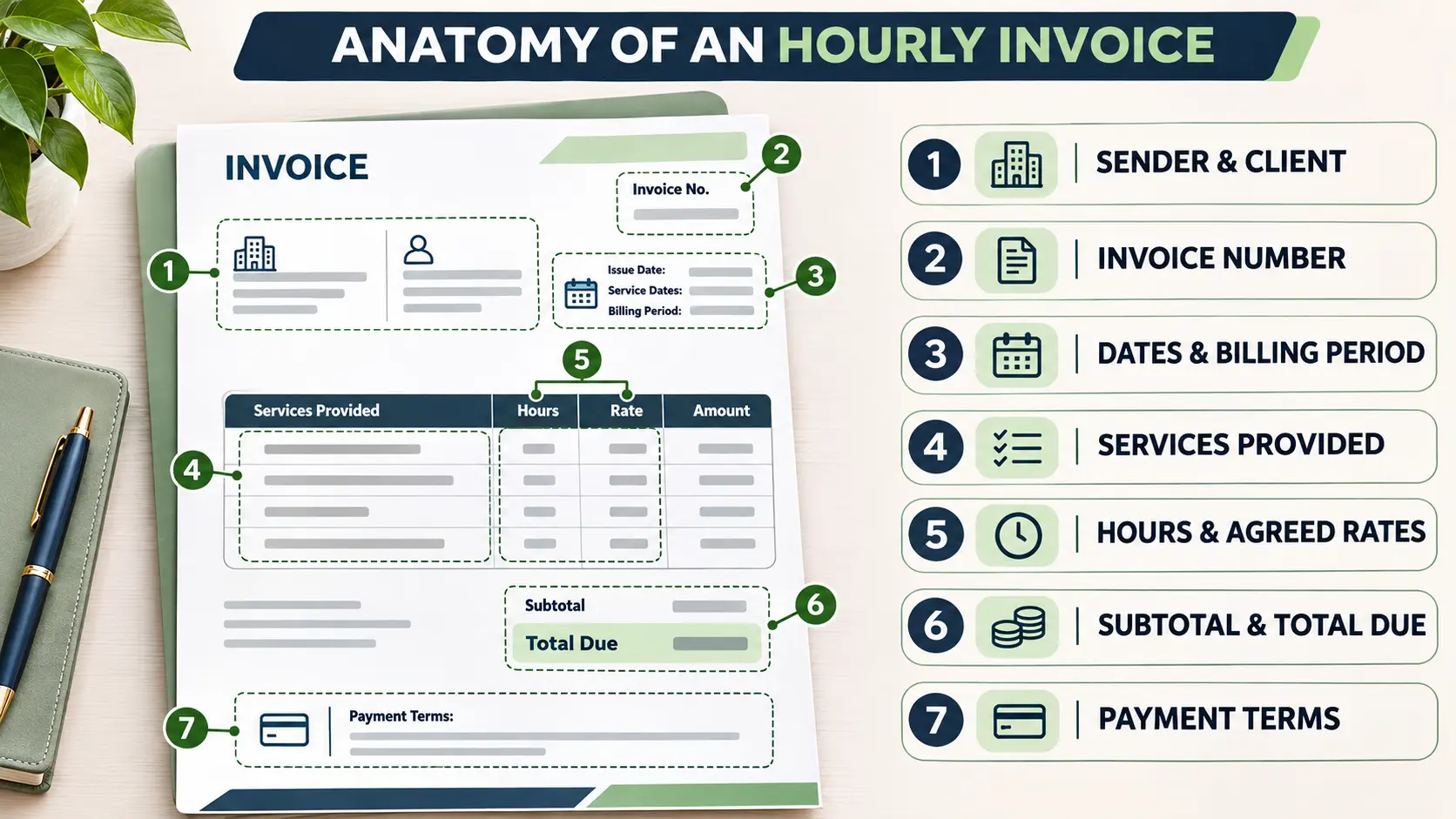
- Who is billing whom. Your business name and contact details, and the client’s name and billing contact.
- A unique invoice number. Something you can find again, such as the DEMO-001 style in the sample.
- Dates. The issue date, the billing period, and the service date for each line.
- Service descriptions. Plain wording the client will recognize, tied to the work that was agreed.
- Hours and rate per line. Reviewed hours, the agreed hourly rate, and the resulting amount.
- Totals. A subtotal, any agreed adjustments, and the amount due.
- Payment terms. The due date and the payment method the two of you agreed to.
What’s required in a particular case depends on your contract, your client’s accounts payable process, and where you operate. If a client sends you invoicing instructions or a purchase order number, follow those. Your agreement comes first.
How to Turn Reviewed Time into Invoice Lines
Start from the reviewed entries for one client and one clearly identified billing period. If the agreement calls for a combined invoice across periods or projects, label those sections separately so the client can reconcile them. Standardizing your timesheet review against documented consultant time tracking categories ensures that every billed item aligns with client approvals before generating the invoice.
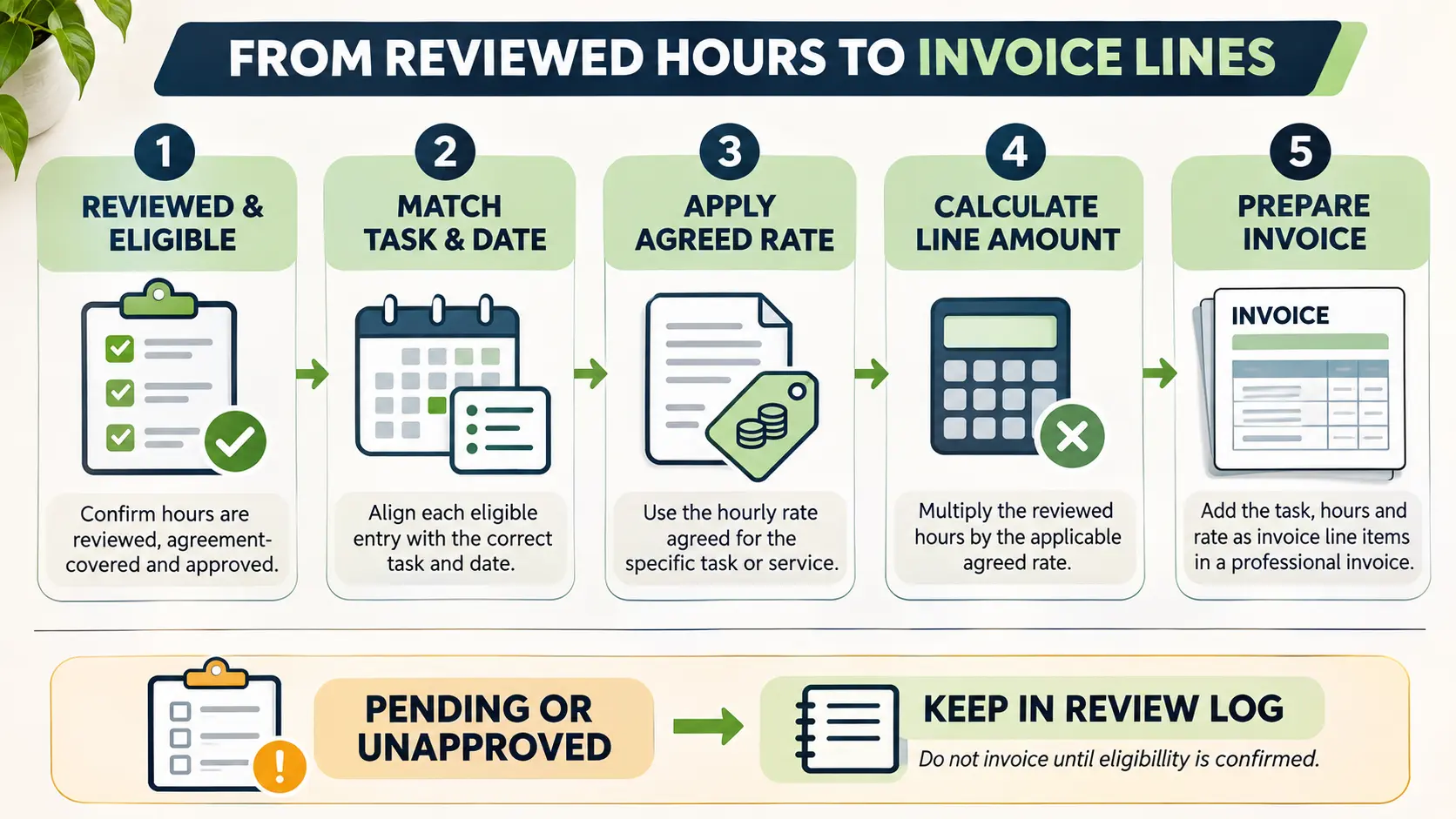
- Pull only eligible, reviewed time. Tracked time isn’t automatically billable. Your agreement decides what counts, which rates apply and what needs approval. Anything pending or unapproved stays out and remains in your review log.
- Write descriptions a client can follow. “Draft implementation specification” tells the reader more than “Work.” Group small entries from the same task on the same day when that keeps the line clear, and keep separate lines where the rate or the deliverable differs.
- Apply the rate from the agreement. Don’t guess or carry over a rate from another client. If the agreement sets a different rate for a type of work, that line gets its own rate.
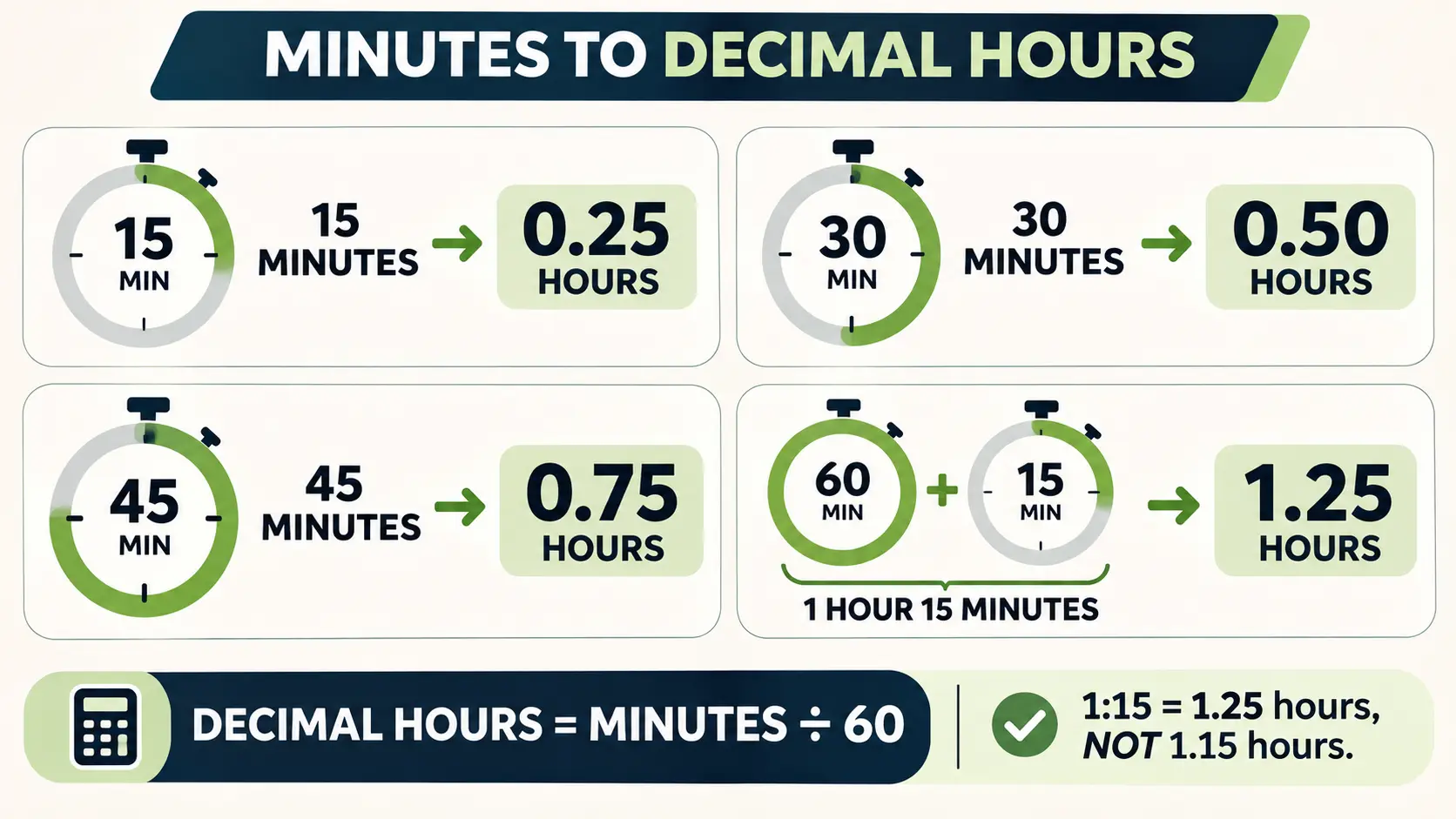
- Enter hours as decimals. In the sample, 1.25 hours means one hour and fifteen minutes. It does not mean one hour and twenty-five minutes.
- Follow the agreement on rounding. Minimum charges and rounding increments differ from one contract to the next. Don’t round every entry up by habit unless your agreement says so.
- Keep the supporting records. Hold on to the reviewed log behind the invoice so you can answer questions later.
One related point on fixed-fee work. If a job is priced as a flat fee, extra time does not automatically change the agreed fee. An hourly invoice only makes sense when hourly billing is what you agreed to.
Calculate the Total and Check Differing Rates
Each line is reviewed hours multiplied by the applicable agreed rate. Using the sample:
- Nov 2: 1.25 hours × $80 = $100.00
- Nov 3: 2.00 hours × $80 = $160.00
- Nov 5: 1.50 hours × $100 = $150.00
- Nov 6: 0.75 hours × $80 = $60.00
Adding the lines gives $470.00, and adding the hours gives 5.50 hours.
For time recorded in hours and minutes, convert the minutes to decimal hours before multiplying by the agreed rate: 15 minutes = 0.25 hours, 30 minutes = 0.50 hours, 45 minutes = 0.75 hours, and 1 hour 15 minutes = 1.25 hours. An entry of 1:15 means 1.25 decimal hours, not 1.15.
A second check helps when rates differ. The standard-rate work is 4.00 hours (1.25 + 2.00 + 0.75) at $80, which is $320.00. The specialist work is 1.50 hours at $100, which is $150.00. Together that’s $320.00 + $150.00 = $470.00, matching the line-by-line total.
If a real invoice includes sales tax, a deposit, a credit, or reimbursable expenses, add them as separate, clearly labeled lines only when your agreement and the rules where you operate call for them. Whether tax applies depends on the type of work, the location and the facts, so don’t assume a percentage from an example.
Set Payment Instructions and Keep a Record
Say how and when you expect to be paid, and use the terms you actually agreed on. In the sample, the due date of November 24 comes from an illustrative Net 14 term, which is not a standard requirement. Some clients use Net 30, some pay on receipt, and some contracts set milestones.
Be careful with late fees. Do not add a late fee solely because the invoice is overdue; check the agreement and applicable local law before charging one. The Freelancers Union Contract Creator shows how a sample contract can spell out rates, payment timing and method, and optional fee or change terms. It’s an example of agreed terms, not legal advice, and your own contract and the law where you work are what count.
Remember that issuing an invoice is not proof of payment. Record an actual payment only when it has been received, using appropriate supporting evidence. While spreadsheet logs work well for straightforward billing cycles, service providers handling multiple client retainers often use dedicated invoicing software for consultants to automate recurring invoices, payment reminders, and fee-cap tracking.
Finally, keep your copies. The IRS lists invoices among the supporting documents that help substantiate business transactions in Publication 583, Starting a Business and Keeping Records. Store the invoice together with the reviewed time record behind it, and check with a tax professional about how long to keep records in your situation.

Editable Hourly Invoice Template
A sample hourly invoice is useful because you can see a finished set of charges; a blank template is useful because you can replace its fields with your own. The workbook below provides both views.
GuidePine has built an Excel workbook, GuidePine_T05_Hourly_Invoice_Sample_and_Blank_Template.xlsx, with three tabs:
- How to Use, with short instructions
- Worked Example, which matches the $470.00 sample above and calculates its total with formulas
- Blank Invoice, with empty fields and automatic line, subtotal and total formulas
The tax and credit cells are optional manual inputs. The workbook does not determine whether tax applies to your situation. Before using it, replace all fictional names, sample dates, rate figures and payment placeholders with your own checked details.
Download the editable hourly invoice workbook (.xlsx): Download the worked example and blank invoice template. It includes How to Use, Worked Example, and Blank Invoice sheets. The sample figures are fictional; verify and replace all details before using a copy with a real client.
Quick Check Before Sending
- The invoice covers one client and one billing period.
- Every line is reviewed time that your agreement allows you to bill.
- No pending or unapproved hours are included.
- Each rate matches the agreement, including any separate rate for specific work.
- Hours are in decimals, and the math checks line by line and in total.
- The invoice number, issue date, due date and client details are correct.
- Payment method and terms match what you agreed.
- Taxes, credits and expenses appear only when they apply.
- You’ve saved a copy of the invoice and the supporting time record.
Frequently Asked Questions About Hourly Invoices
Do I Need to Attach My Full Timesheet?
Not always. Many invoices work with task-level lines like the sample, and the detailed log stays in your records. Some clients ask for the log, or their contract requires it, so check your agreement and any client instructions. Either way, keep the supporting record so you can share it if someone asks.
Can the Same Invoice Include Different Hourly Rates?
Yes, when your agreement sets different rates for different work. Give each rate its own line, as the sample does with the $100 specialist review, and make sure the rate is written into the agreement. A surprise rate with no basis in the contract invites disputes.
For your next hourly invoice, begin with the reviewed, agreement-covered hours, check each line against the agreed rate, and save the issued invoice alongside its supporting record.