

A website development invoice should state which milestone is being billed, what evidence shows it was reached, what has already been paid, and what remains. If it does those four things, the client can approve it without a phone call. This guide gives you the required fields, a copy-ready template, and a fully reconciled $6,550.00 worked example you can adapt for your own projects.
Everything here is free and ungated. While commercial accounting platforms like FreshBooks offer free, ungated generic invoice forms on their websites, web developers need templates built specifically for multi-stage technical builds. You can copy the text template below or access the standalone Word and PDF files without a paywall. The dollar amounts, company names, and invoice numbers in the worked example are hypothetical and exist solely to demonstrate the math.
Why Website Development Invoices Need Milestone Protection
A website is not a single deliverable. It is built in stages, depends on client content and third-party software, and usually passes through a private staging site before it goes live. An invoice that treats the project as one lump sum at the end leaves you carrying all the cost and schedule risk until the last day.
Milestone billing ties each payment to a verifiable technical event, such as a signed contract, a working staging deployment, or a production launch. That is different from an hourly invoice, which bills elapsed time, and different from a vague progress invoice that says “project 60% complete.” If you also bill some work hourly, the structure in our sample invoice for hours worked covers timesheet attachments and rate calculations. If your hourly records are the weak point, start with billable time tracking habits before you build the invoice itself.
The table below compares the four models most web developers use. None is correct for every project. The right choice depends on how well the scope is defined and how much trust exists between you and the client.
| Billing Model | Best Application | Payment Trigger | Risk & Governance Profile |
|---|---|---|---|
| Milestone billing | Defined builds with a written scope of work | Completion of a stated technical milestone | Low cash flow risk when deposits fund early work; low friction when objective criteria are documented. |
| Hourly billing | Open-ended enhancements, debugging, evolving scope | Hours logged in an agreed billing period | Moderate risk from timesheet approval lag; requires agreed budget caps to prevent client friction. |
| Monthly maintenance retainer | Ongoing updates, security patches, hosting oversight | First day of billing month or service period | Low cash flow risk with predictable recurring income; requires clear boundaries on included scope. |
| Hybrid billing | Fixed core build plus hourly change orders after launch | Milestones for build, hours for post-launch additions | Moderate administrative complexity; requires clear written demarcation between fixed and variable deliverables. |
For most fixed-price builds, milestone billing with a deposit is the safest default. The rest of this guide assumes that model and shows where hourly or retainer work fits around it.
Essential Fields for Technical Invoicing
An invoice is a commercial document, and a client’s accounts payable team will check it against the contract. Missing or inconsistent fields are a common reason a payment sits unprocessed. The five groups below cover what a web development invoice should contain.
1. Header, Professional Identifiers, and Tax Information
Start with your legal name or agency name, your business address, and your contact email. Add the client’s legal business name and the billing address or accounts payable contact they gave you, which may differ from the person you work with day to day.
Use a unique, sequential invoice number and never reuse one. Include the invoice date and the due date. If you operate under an EIN or your own taxpayer identification, decide how you will share it. Many clients ask for a W-9 before the first payment, so keep a current one ready rather than printing sensitive numbers on every invoice. Whether web development services are subject to sales tax varies by state, so confirm the rule for your state and the client’s state before you add or omit a tax line.
2. Project Scope Reference and Contract Linkage
Tie the invoice to the agreement that authorizes it. Name the project, then cite the proposal, statement of work (SOW), or contract by title and date, for example “Statement of Work dated March 3, 2026.”
This single line prevents many disputes because it points the reader to the governing document. If your proposal and contract are separate, reference the one that contains the payment schedule. For background on how those documents differ from invoices, see our freelance proposal template.
3. Milestone Definition and Completion Evidence
State the milestone name exactly as it appears in the contract, then state the evidence that it was reached. Evidence can be a staging URL, a note that test credentials were sent on a specific date, a link to a short acceptance checklist, or the date of a recorded sign-off.
Avoid descriptions such as “Design phase complete.” Prefer “Staging site deployed at the agreed URL on [DATE]; acceptance checklist sent for review.” A reader who has never seen the project should be able to tell what happened and when.
4. Itemized Change Orders and Pass-Through Expenses
List approved change orders and pass-through expenses on their own lines, separate from the base milestone amount. Give each change order a number and reference the written approval. Give each expense a plain description, such as “Commercial plugin license, annual,” and attach or reference the receipt.
Keeping these lines separate protects the integrity of the base contract sum. The client can see that the original milestone was billed at the original price and that additions were billed only because they were approved.
5. Financial Summary, Cumulative Ledger, and Payment Terms
Close with a short ledger: the revised total project value, payments received to date, the current amount due, and the balance remaining after this invoice. Then list the due date, accepted payment methods, and any late payment terms.
A cumulative ledger is the field most often skipped, and it is the one that lets a client verify your math in thirty seconds. For guidance on choosing and wording net terms, deposits, and late fees, read payment terms on an invoice. Treat any late fee, such as 1.5% per month, as a negotiated commercial term that must appear in your signed agreement and comply with applicable state law. It is not an automatic statutory entitlement.
Structuring Milestone Draws for Web Development Projects
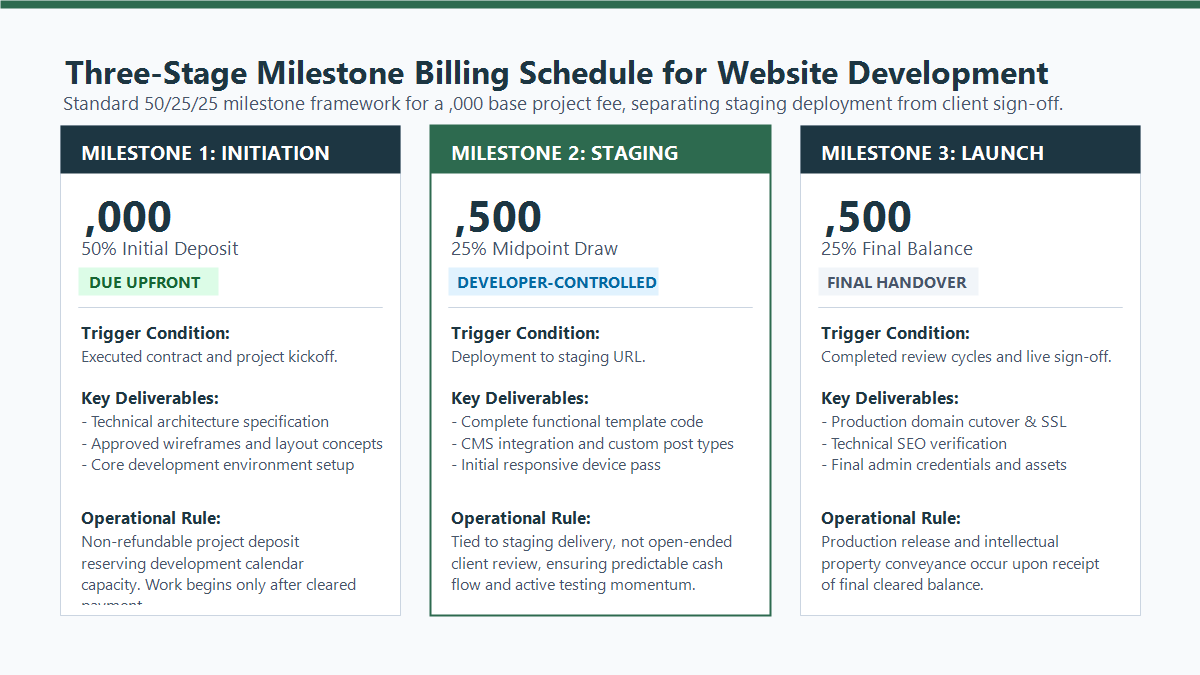
A common structure is a 50/25/25 split: 50% at signing, 25% at staging deployment, and 25% at launch. These percentages are an example of a negotiated arrangement, not a legal requirement or an industry mandate. Adjust them to the project size, the client’s risk profile, and what the client will accept. A small brochure site might use two draws, while a large build might use four or five.
Phase 1: Deposit at contract signing (50%). The deposit reserves your schedule and funds discovery, architecture, and initial setup. It also confirms the client is committed before you invest unpaid time. Invoice it when the contract is signed, and state clearly whether the deposit is refundable.
Phase 2: Staging deployment and review checklist delivery (25%). This draw is triggered when the build is deployed to a private, password-protected staging environment and the client has been given the credentials and checklist needed to review it. Notice that the trigger is deployment and review access, which you control, rather than the client’s final approval, which you do not. If you want payment to depend on approval, you need written acceptance criteria and a defined review window.
Phase 3: Production launch (25%). This draw is triggered by the production DNS cutover, final data migration, and a final sign-off. Many developers hold transfer of production hosting credentials or final file delivery until this payment clears, which is covered in the source code section below.
Write Objective Staging Acceptance Criteria
The fastest way to turn a milestone into an argument is to leave acceptance subjective. “The client approves the design” invites open-ended revision. A better approach is a short list of tests that either pass or fail, agreed before work begins.
Examples of testable criteria include:
- Pages render correctly in the current versions of Chrome, Safari, Firefox, and Edge.
- Layouts are usable at agreed mobile and desktop viewport widths.
- Contact and quote forms deliver a test submission to the specified inbox.
- A complete test checkout, run in the payment gateway’s sandbox mode, finishes without error.
- Page performance meets thresholds you name in the SOW, measured with a named tool.
For performance, the Core Web Vitals metrics from Google (Largest Contentful Paint, Interaction to Next Paint, and Cumulative Layout Shift) give you recognized targets. Be careful about how you apply them. A staging site has no real-world user data, so lab measurements are only a proxy, and results vary by tool and settings. Name the tool, the page set, and the thresholds in writing. For markup and accessibility, you can reference W3C standards the same way, by stating which checks apply.
Finally, define a review window, such as ten business days, and state what happens when it passes. Whether silence counts as acceptance is a term to negotiate and write into the contract, not an assumption to make on the invoice.
Copy-Ready Website Development Invoice Template
The template below uses generic bracketed placeholders. Replace each bracket with your own details, delete lines that do not apply, and keep the labels so the invoice stays consistent across clients. Never leave a bracket in a document you send.
Website Development Invoice Template
Adapt this plain-text invoice directly into your accounting software or email billing workflow.
INVOICE

[DEVELOPER NAME / AGENCY]
[DEVELOPER ADDRESS]
[DEVELOPER EMAIL] | [DEVELOPER PHONE]

BILL TO
[CLIENT BUSINESS NAME]
[CLIENT BILLING CONTACT]
[CLIENT BILLING ADDRESS]

Invoice Number: [INVOICE NUMBER]
Invoice Date: [INVOICE DATE]
Due Date: [DUE DATE]

PROJECT DETAILS
Project: [PROJECT NAME]
Governing Document: [SOW / CONTRACT TITLE] dated [DATE]
Milestone Billed: [MILESTONE DRAW, e.g. Milestone 2, Staging Deployment and Review Checklist Delivery]
Completion Evidence: [STAGING URL / DEPLOYMENT DATE / DELIVERED CHECKLIST DATE]

MILESTONE SCHEDULE
| Milestone | Percent | Amount | Status |
|---|---|---|---|
| [MILESTONE 1: PROJECT KICKOFF & DEPOSIT] | [PERCENT] | [AMOUNT] | [PAID ON INVOICE NUMBER / DATE] |
| [MILESTONE 2: STAGING DEPLOYMENT & CHECKLIST DELIVERY] | [PERCENT] | [AMOUNT] | [BILLED ON THIS INVOICE] |
| [MILESTONE 3: PRODUCTION LAUNCH & FINAL TURNOVER] | [PERCENT] | [AMOUNT] | [NOT YET BILLED] |

ITEMIZED ADJUSTMENTS
Approved Change Order [NUMBER]: [DESCRIPTION] ... [AMOUNT]
  Written approval dated: [DATE]
Pass-Through Expense: [DESCRIPTION] ... [AMOUNT]
  Receipt reference: [RECEIPT REFERENCE]

FINANCIAL SUMMARY
Base Contract Sum: [AMOUNT]
Approved Change Orders to Date: [AMOUNT]
Pass-Through Expenses to Date: [AMOUNT]
Revised Total Project Value: [AMOUNT]
Paid to Date (before this invoice): [AMOUNT]
AMOUNT DUE ON THIS INVOICE: [AMOUNT]
Paid to Date (after this invoice clears): [AMOUNT]
Remaining Balance: [AMOUNT]

PAYMENT INSTRUCTIONS
Accepted methods: [ACH / CHECK / CARD / OTHER]
Payment details: [PAYMENT INSTRUCTIONS OR LINK]
Reference: [INVOICE NUMBER]

TERMS
Payment terms: [NET TERMS PER SIGNED AGREEMENT]
Late payment: [LATE FEE TERMS, IF AGREED IN WRITING AND PERMITTED BY STATE LAW]
Notes: [OWNERSHIP AND ACCESS TERMS, OR REFERENCE TO CONTRACT SECTION]
Free Website Development Invoice Downloads
Choose a blank template or a reconciled worked example. Available as editable Word documents and print-ready PDFs. No signup required.
Blank Invoice Template
Clean, customizable invoice structure with milestone schedule, itemized adjustments, and contract reconciliation ledger.
Worked Example Invoice #1042
Completed $6,550 mid-project invoice with $2,050 due, Milestone 2 staging draw, approved change order, and pass-through plugin license.
Worked Example: Invoice #1042 for E-Commerce Website Redesign

This is a hypothetical worked example. The developer, client, and amounts are invented to show how the ledger works. Suppose a freelance web developer is building a custom e-commerce website redesign for a client under a base contract sum of $6,000.00, billed 50/25/25. The deposit invoice, #1001, was paid at signing. The developer has now deployed the site to a password-protected staging environment and is billing Milestone 2. During staging work, the client approved in writing a $400.00 change order for a custom shipping calculator with a CRM webhook, and approved the purchase of a commercial plugin license at $150.00.
Here is how Invoice #1042 reads, with fictional details filled in:
Invoice #1042: E-Commerce Redesign Interim Draw
Fully populated mid-project invoice reconciling Milestone 2 staging draw, change order, and pass-through software.
INVOICE #1042

Alder Street Web Studio
112 Alder Street, Suite 4, Portland, OR 97201
billing@alderstreetweb.example

BILL TO
Harbor & Pine Outfitters
Accounts Payable
48 Dock Road, Portland, ME 04101

Invoice Date: June 12, 2026
Due Date: June 26, 2026

PROJECT DETAILS
Project: Custom E-Commerce Website Redesign
Governing Document: Statement of Work dated March 3, 2026
Milestone Billed: Milestone 2, Staging Deployment and Review Checklist Delivery
Completion Evidence: Staging site deployed June 9, 2026; acceptance
checklist and test credentials sent June 9, 2026

LINE ITEMS
Milestone 2 (25% of base contract: Staging Deployment & Review Delivery) ... $1,500.00
Approved Change Order #1: Custom shipping calculator
  and CRM webhook (written approval dated May 21, 2026) ....................... $400.00
Pass-through expense: Commercial WooCommerce plugin
  license, at cost (receipt attached) ........................................ $150.00

AMOUNT DUE ON INVOICE #1042 ................................................ $2,050.00

LEDGER
Base contract sum ........................................................ $6,000.00
Approved change order #1 .................................................... $400.00
Pass-through expense ........................................................ $150.00
Revised total project value ............................................... $6,550.00
Paid to date (Invoice #1001, deposit) ..................................... $3,000.00
Due on this invoice ....................................................... $2,050.00
Paid to date after this invoice clears .................................... $5,050.00
Remaining balance (Milestone 3, due at launch sign-off) ................... $1,500.00

Terms: Net 14 per Statement of Work.
The same numbers, organized as a ledger:
| Item | Amount | Billed On | Status |
|---|---|---|---|
| Milestone 1: Project Kickoff and Architecture Deposit (50%) | $3,000.00 | Invoice #1001 | Paid |
| Milestone 2: Staging Deployment and Review Checklist Delivery (25%) | $1,500.00 | Invoice #1042 | Due now |
| Approved Change Order #1: Shipping Calculator and CRM Webhook | $400.00 | Invoice #1042 | Due now |
| Pass-Through: Commercial Plugin License | $150.00 | Invoice #1042 | Due now |
| Milestone 3: Live Deployment, Final Data Migration, and Launch (25%) | $1,500.00 | Future invoice | Due at launch sign-off |
| Revised total project value | $6,550.00 |
How to Reconcile the Ledger Step by Step
Follow these steps to confirm the math before you send the invoice. The same checks let the client’s accounts payable team verify it in a minute.
- Start with the base contract sum: $6,000.00. Milestone percentages apply to this number only, so 50%, 25%, and 25% equal $3,000.00, $1,500.00, and $1,500.00.
- Add approved additions: $6,000.00 plus the $400.00 change order plus the $150.00 pass-through gives a revised total project value of $6,550.00.
- Total the current invoice: $1,500.00 plus $400.00 plus $150.00 equals $2,050.00.
- Reconcile cumulative payments: the $3,000.00 deposit plus the $2,050.00 now due equals $5,050.00 once Invoice #1042 clears.
- Confirm the remaining balance: $6,550.00 minus $5,050.00 equals $1,500.00, which is exactly Milestone 3.
- Check for exact equality: $3,000.00 plus $2,050.00 plus $1,500.00 equals $6,550.00, so the three invoices account for 100.0% of the revised project value.
The $400.00 change order is billed once, on Invoice #1042. It is not added to the Milestone 3 balance, which stays at $1,500.00. Double-counting an approved addition is among the easiest ways to create a dispute, and the ledger is how you prevent it.
Managing Out-Of-Scope Requests and Third-Party Expenses
Most invoice disputes in web projects trace back to scope. The client sees a small addition, such as one more form field or an extra page template, as part of the original job. The developer sees unpaid work that was never priced. If the only place the disagreement is recorded is a thread of emails, the invoice becomes the first formal moment both sides discover they disagree.
Use a Written Change Order Protocol
A written change order is a short document describing the added work, the price, the effect on the schedule, and the client’s approval. Set a threshold in your contract, such as any request that adds more than a specified number of hours or changes an agreed deliverable, and state that work on those requests begins only after written approval.
Approval can be a signature or a reply email that clearly accepts the stated price and scope, depending on what your contract allows. Number each change order and reference that number on the invoice, as the worked example does. The goal is that no line on an invoice should surprise the person paying it.
You also need to decide how a change order interacts with your milestones. In the worked example, the change order was approved during staging, so it was billed on the Milestone 2 invoice. Other arrangements are fine, such as billing change orders in the next milestone invoice or on a separate invoice, as long as each is billed exactly once and the ledger shows it.
Bill Third-Party Expenses Transparently
Commercial plugin licenses, premium themes, fonts, stock assets, domain registrations, and hosting are costs that exist outside your labor. You have two common options. You can pass them through at net cost with a receipt, or you can add a disclosed handling markup that your contract allows.
Pass-through at cost is simpler to explain and easier for a client’s finance team to approve. A markup is a legitimate commercial choice only if the client agreed to it in advance, so state the policy in the proposal rather than surprising them on the invoice. Whichever you choose, get approval for any significant purchase before you make it.
Also consider whose name the license is in. When practical, have the client purchase licenses and domains in their own accounts so the right to use them is clearly theirs. If you buy and bill them, say in the contract who owns the license and what happens to it when the engagement ends.
Legal Realities: Copyright Transfer, Deliverable Rights, and Code Access
This section is general information, not legal advice. Ownership of code and the right to withhold access are legal questions that depend on your contract and your jurisdiction. If a payment dispute reaches this point, consult a licensed attorney.
Payment Does Not Automatically Transfer Copyright
Many developers assume that when the final invoice is paid, the client owns the code. Under 17 U.S.C. § 204, a transfer of copyright ownership is not valid unless it is made in an instrument of conveyance or a note or memorandum of the transfer, in writing and signed by the owner of the rights conveyed. You can read the statute at 17 U.S.C. § 204 on Cornell Law School’s Legal Information Institute.
In practice, this means paying an invoice does not by itself transfer statutory copyright ownership of custom code or digital assets. If you intend the client to own the work, say so in a signed written agreement, and say when the transfer takes effect. Many developers make the transfer effective upon receipt of full payment, which is a clear, negotiable term.
Ownership can also depend on whether the work qualifies as a work made for hire, a doctrine that applies to independent contractors only in specific circumstances. The U.S. Copyright Office explains the basics in Circular 30 on works made for hire. Because those rules are technical, do not assume your project falls inside or outside them. Have the agreement say what you intend.
Implied Licenses Complicate Withholding
The inverse assumption is also risky. In *Effects Associates, Inc. v. Cohen*, 908 F.2d 555 (9th Cir. 1990), the Ninth Circuit held that a party who creates work at another’s request and hands it over, intending that the other party copy and distribute it, can grant an implied non-exclusive license through conduct, even without a signed transfer of ownership. The result is fact-specific, and it is an exception rather than a universal rule.
The practical takeaway is that you cannot assume a client has no rights simply because the copyright was never formally assigned, and you cannot assume you may hold everything hostage until you are paid. Whether withholding credentials is a lawful and effective remedy depends on your contract, what you delivered, and what the client has already been permitted to do. It is a complicated legal issue, not a simple lever.
Professional Practice for Access and Handover
The cleanest approach is to settle these points in the agreement before work starts. Common practices include:
- Giving the client staging access so they can verify the work, while retaining production server transfer and final file delivery until the last payment clears.
- Stating in the contract when ownership or license rights transfer, and what license applies in the meantime.
- Specifying who holds hosting, domain, and repository accounts during the project and who holds them at handover.
- Listing these terms alongside net days, deposits, and late fees. Our guide to payment terms on an invoice shows how to word those provisions.
For a general definition of what makes an agreement enforceable, the Legal Information Institute’s entry on contracts is a useful starting point. A one-line reminder on the invoice, such as “Ownership and access terms are governed by Section [X] of the agreement,” keeps the point visible without restating the contract.
Common Web Development Invoicing Errors and How to Prevent Them
These five errors are all preventable with structure you can put in place before the first invoice goes out.
1. Invoicing 100% on Completion (No Upfront Deposit)
When the only invoice is the final one, you finance the entire project. You also lose leverage because the client has received everything and has little reason to hurry. Use a deposit at signing and at least one intermediate milestone. The deposit amount is negotiable, but some upfront payment is a standard way to align both sides.
2. Vague Milestone Descriptions Lacking Objective Verification
A line such as “Development phase” says nothing about what the client should expect or verify. Name each milestone, link it to a deployment or a test, and attach the acceptance checklist. The clearer the trigger, the less room there is for a debate about whether it has been met.
3. Blending Unapproved Scope Additions into Base Milestones
Quietly adding extra work into a milestone amount makes the invoice no longer match the contract. Clients notice, and their accounts payable team may reject the document. Bill approved additions as numbered change orders on separate lines, and decline to start unapproved work until the approval exists.
4. Missing Payment Terms and Ambiguous Due Dates
An invoice without a due date has no deadline. “Due upon receipt” and “Net 30” mean different things, and neither is helpful if the contract says something else. State the due date, the accepted payment methods, and any agreed late fee on every invoice, and make sure they match the signed agreement. See payment terms on an invoice for how to choose and word them.
5. Failing to Reconcile the Cumulative Project Balance
If each invoice shows only its own amount, nobody can tell whether the project is on track to match the contract. Always include the revised total, payments to date, the current amount due, and the remaining balance. Before sending, reconcile cumulative payments against the revised total, the way the worked example does in six steps.
Frequently Asked Questions About Web Development Invoices
When should I send the final invoice for a web development project?
Send it when the final milestone trigger in your contract is met, typically production launch and the final sign-off. Issue the invoice the same day or the next business day while the project is fresh, and state the due date under your agreed terms. If your contract allows you to hold production handover until payment, say that on the invoice.
Can I withhold source code or hosting credentials if a client refuses to pay?
It depends, and you should not assume the answer is yes. Under 17 U.S.C. § 204, copyright transfers only through a signed writing, but under *Effects Associates v. Cohen* a client who received work at their request may hold an implied non-exclusive license. Your contract, what you have delivered, and your state’s law all matter. Put the terms in the agreement in advance, and speak with an attorney before taking action in an active dispute.
How should I bill for third-party tools, themes, and plugins?
List each as its own line item, separate from your labor. Pass the cost through at net with a receipt attached, or add a markup only if your agreement discloses it. Get client approval before purchasing anything significant, and clarify whose account holds the license.
What should I do if a client delays user acceptance testing on staging?
First, check what your contract says about the review window and what happens when it passes. Then send a short, dated follow-up that names the specific action you need, the checklist, and the deadline. The same principles of a clear ask and a clear next step apply as in our guide on how to follow up on a proposal. If you anticipated this in the SOW by tying the Milestone 2 draw to staging deployment and checklist delivery rather than to subjective approval, you can invoice on schedule while the review continues.
Is it better to bill web development hourly or by fixed milestones?
Fixed milestones fit projects with a well-defined scope, because the client knows the total and you are paid at predictable points. Hourly billing fits unclear or evolving work, such as troubleshooting or ongoing enhancements. Many developers use a hybrid, with milestones for the build and hourly or retainer billing afterward. Whichever you choose, record time carefully (our guide to project management plan examples shows how to define scope and phases up front), and put the billing method in writing before work begins.
Before You Send the Invoice
Run a final check. The invoice number is unique. The milestone name matches the contract. The completion evidence is attached or linked. Change orders and expenses are on separate lines. The ledger reconciles. The due date and payment instructions are correct. These checks take a few minutes and prevent most of the delays described above.
A well-structured invoice cannot make a client pay, and it does not replace a clear contract. What it can do is remove avoidable questions, so that any disagreement is about the substance of the work rather than about the paperwork.